[av_one_full first min_height=” vertical_alignment=” space=” custom_margin=” margin=’0px’ row_boxshadow=” row_boxshadow_color=” row_boxshadow_width=’10’ link=” linktarget=” link_hover=” padding=’0px’ highlight=” highlight_size=” border=” border_color=” radius=’0px’ column_boxshadow=” column_boxshadow_color=” column_boxshadow_width=’10’ background=’bg_color’ background_color=” background_gradient_color1=” background_gradient_color2=” background_gradient_direction=’vertical’ src=” background_position=’top left’ background_repeat=’no-repeat’ animation=” mobile_breaking=” mobile_display=” av_uid=’av-3vyx9u’]
[av_textblock size=” font_color=” color=” av-medium-font-size=” av-small-font-size=” av-mini-font-size=” av_uid=’av-jyrfc3vi’ admin_preview_bg=”]

[/av_textblock]
[/av_one_full][av_one_full first min_height=” vertical_alignment=” space=” custom_margin=” margin=’0px’ padding=’0px’ border=” border_color=” radius=’0px’ background_color=” src=” background_position=’top left’ background_repeat=’no-repeat’ animation=” av_uid=’av-5deakv’]
[av_textblock size=” font_color=” color=” av-medium-font-size=” av-small-font-size=” av-mini-font-size=” av_uid=’av-jyrkvd47′ admin_preview_bg=”]
How to Text Us
Now that you have our text messaging info, save it into your phone “contacts” to text us later.
1. Create a new contact:
Save the number you got the text from as the Phone Number
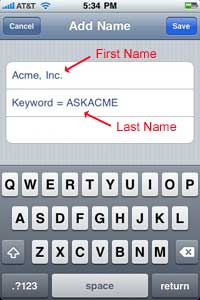
Save our organization name as the First Name (ex. Acme, Inc.)
Save our keyword as the Last Name (ex. ASKACME)
*If you are ever asked to start your message with a keyword, you’ll have it saved as the Last Name.
Above: Save our organization name as the First Name and our keyword as the Last Name.
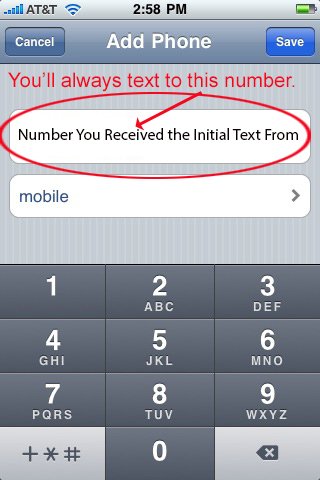
Above: Enter
the number you got the text from in as the
Phone Number.
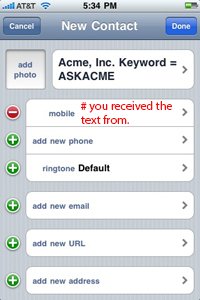
Above: What it will look like in your contacts when you’re finished.
2. When you want to text us:
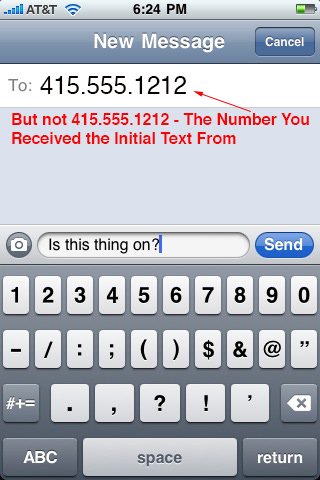
Compose a new text message to the number you got the text from.
Type your message and press Send.
3. Wait for your response.
Important: If you share our text messaging info with your friends/colleagues, make sure you let them know to use our keyword the first time they send us a text.
That’s it, you’re ready to go!
Powered by Mosio
Message and Data Rates May Apply. Text STOP to 66746 to opt-out.
Support: support[[at]]mosioproject.com / 877.667.4699
Privacy: http://www.mosio.com/privacy.php
[/av_textblock]
[/av_one_full][av_one_full first min_height=” vertical_alignment=” space=” custom_margin=” margin=’0px’ padding=’0px’ border=” border_color=” radius=’0px’ background_color=” src=” background_position=’top left’ background_repeat=’no-repeat’ animation=” av_uid=’av-2hvvcf’][/av_one_full]